Writing calendar events by hand
Apple Pencil, S Pen, Boox and USI styluses. What it does, and the one thing people get wrong.
Handwriting needs a stylus. Finger writing isn't supported and isn't a setting you've missed. If your device has no pen, the affordance doesn't appear at all. The reasons are further down.
You write "soccer Thu 5pm" into Thursday. It becomes a real calendar event that syncs to everyone's phones. That's the whole feature. What doesn't happen matters as much: no form, no keyboard, no confirmation dialog, no tapping a plus button first.
Recognition, not annotation
This is the distinction that matters when comparing apps, and it's easy to miss from a screenshot because both look the same in a still image.
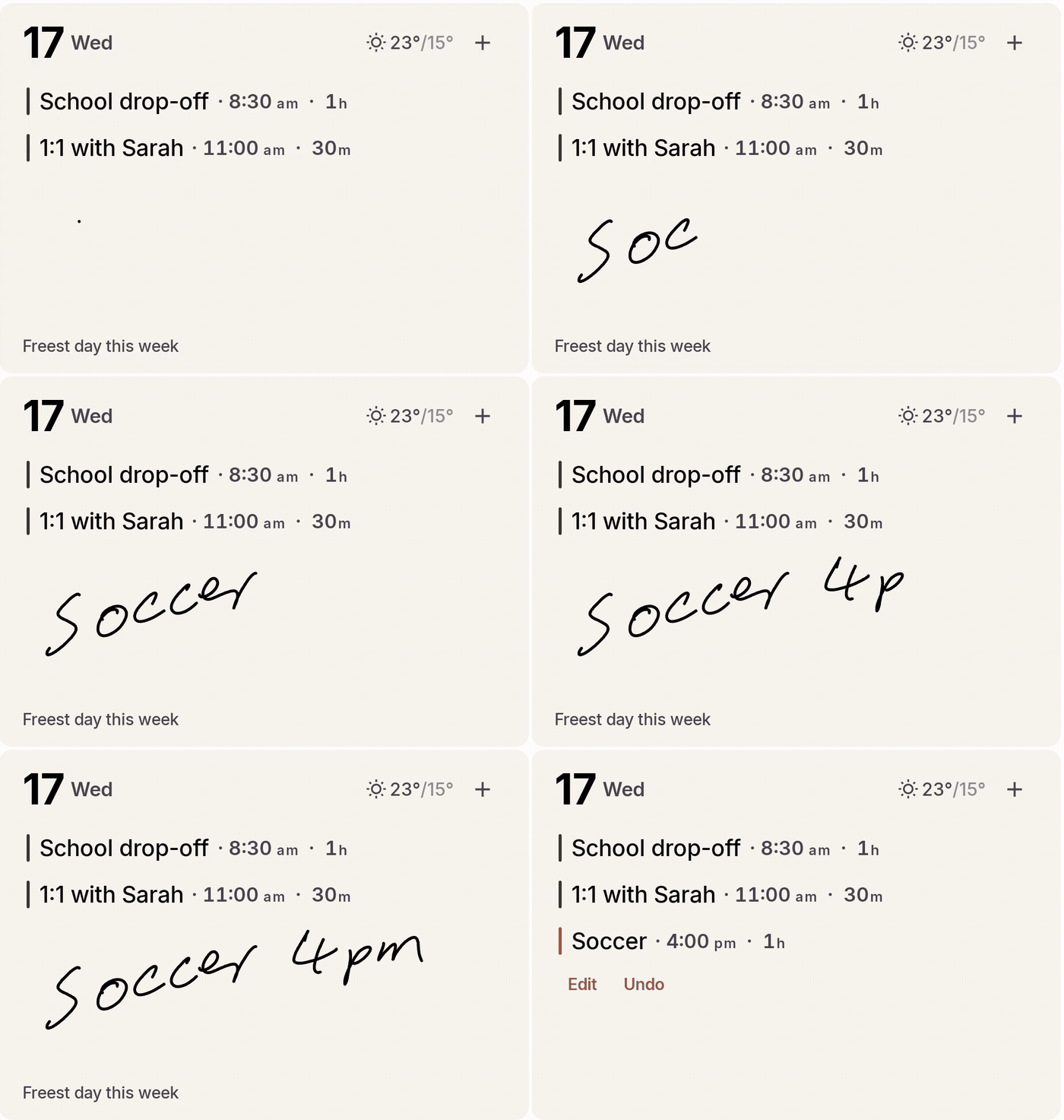
Lift the pen and the receipt chip lands: Soccer · 4:00pm, with Edit and Undo.
Most stylus calendar apps keep your ink as ink. Pencil Planner, CalenDraw and Penjo all let you draw on a calendar, sometimes over real system events, and what you've drawn stays a drawing. It doesn't notify anyone, doesn't appear on your partner's phone, doesn't show up in a search, and doesn't exist to any other app.
Jotcal reads the strokes and throws them away. What's left is an event in your actual calendar, with a title and a start time, syncing through whatever provider you already use. Your spouse sees it on their iPhone without owning a stylus or knowing Jotcal exists.
If you want a beautiful hand-drawn planner, the annotation apps are better at that than Jotcal is and I'd send you to them. If you want the writing to turn into something the rest of your household can see, that needs recognition.
What happens when you lift the pen
The design here took a couple of goes to get right, and the early version was wrong in an instructive way.
The obvious approach is to recognise the writing and then show a form: title, time, location, Save and Cancel, all pre-filled. Both apps did this originally. It works, and it kills the magic completely, because the moment a form appears you're doing data entry again. On a wall device it's worse than that, because you write on a wall and then walk away, and a form left waiting for a second touch either doesn't get one or traps you there.
So the stroke is treated as the decision. The event is created straight away and a read-only receipt chip lands in the day it parsed to, showing what it understood: Soccer · 4:00pm. Two things ride along with it for a few seconds, Edit and Undo, and then the chip settles into an ordinary event and they disappear. The event stays editable forever by tapping it, the way any event is.
The chip lands in the destination day, not the day you wrote in, and says so explicitly when those differ. That case is real: write "dentist tomorrow 9am" into Monday and it belongs on Tuesday, which might not even be on screen. Silently moving it was the bug that made this whole design necessary.
On Android, the sync trigger is held for those few seconds so an undone misread never reaches the rest of the family's devices. On iOS the event saves to EventKit immediately because there's no local store to defer, so a very fast undo can briefly flicker on another device. It's the one case where the two platforms behave differently.
There's no pen tool to select
The whole calendar is a writing surface, all the time. There's no pencil icon in a toolbar, no writing mode, nothing to turn on before you write.
This works because pen and finger do different jobs. A stylus stroke is writing. A finger passes straight through to scrolling and tapping, exactly as it would if handwriting didn't exist. You never choose between them, because the hardware already knows which one touched the screen.
A whiteboard doesn't have a mode. You pick up the pen and write, and the not-having-to-decide is most of why the whiteboard beat the phone in the first place.
Which devices can do it
iPad with an Apple Pencil. Any Pencil generation your iPad supports. The handwriting surface appears on iPad and not on iPhone, because there's no Pencil to pair with an iPhone.
iPhone gets a different path. Quick Add takes typed natural language, so "lunch with Sam Friday 12:30" typed out parses the same way. It's useful, and it isn't handwriting. An iPhone can't do what an iPad with a Pencil does.
Android with a stylus digitizer. Jotcal checks whether the device declares stylus support, and separately probes for any connected input device reporting as a stylus. In practice that covers Samsung Galaxy Note and Tab S with the S Pen, the Pixel Tablet with a USI pen, and every Boox device, which all carry a Wacom layer even when they don't advertise the system feature.
Boox gets the low-latency path. Ordinary Android touch handling puts strokes noticeably behind the nib, which feels broken on paper-like hardware. Jotcal uses Onyx's raw drawing mode to paint the stroke ahead of the app, the same route Boox's own note app takes. That took two attempts and about six months of a wrong diagnosis, and it works now.
If your device has no pen, you'll see no handwriting affordances at all. No greyed-out buttons, no upsell.
Why finger writing isn't supported
This is the most common question.
Two problems, and the second is the fatal one. Finger writing is much less accurate, because a fingertip is a wide, soft, imprecise contact patch and recognition is working from stroke geometry. And a finger is also how you scroll, tap and open things, so the app would have to guess which one you meant on every single touch. Any guess is wrong some of the time, and a calendar that sometimes scrolls when you meant to write, or writes when you meant to scroll, is worse than one that does neither.
The stylus resolves it for free. The hardware tells the app which instrument touched the glass, so there's nothing to guess and no mode to switch. That's why the feature is hardware-gated rather than settings-gated.
Where the reading happens
On your device, on both platforms. Nothing is uploaded to be read.
On iOS the strokes are rendered and read by Apple's on-device Vision framework, then parsed for a date and time. That parsing has tiers: on newer hardware with Apple Intelligence it uses the on-device language model, and otherwise falls back to Apple's system date detector plus Jotcal's own splitting. All of it local.
On Android it's ML Kit's digital ink recognition. The language model downloads once, and after that recognition runs offline. That download is the only time a network is involved, and it carries no handwriting with it.
Your handwriting never leaves your device on either platform. There's no Jotcal account to attach it to.
It's free, on both platforms
Handwriting is in the free tier permanently. Not in the trial, not in Pro. It stays working after the 14 days end and after you decide not to buy anything.
The name is "Jot" plus "cal." Charging for the jot would be charging for the point of the product, and writing in general is never gated here: tapping to add, editing, deleting and completing tasks are all free too. Pro is the rethought presentation layer, which is the layouts, the weather woven into the day, the widgets and the insight overlays.
The iOS app once shipped with an entitlement check on handwriting that contradicted this. That was a defect, not a policy, and it's fixed.
What it gets wrong
Recognition wants ordinary tidy handwriting. Quick writing is fine. A genuine scrawl degrades, and if your handwriting is bad this feature will be worse for you than it is for me, which is not a thing I can design around.
Times parse more reliably than titles. "5pm", "5:30", "half 5" and weekday names are solid. An unusual proper noun in the title is where misreads cluster, so a name gets mangled more often than a time does.
Recurrence isn't parsed. Writing "swimming every Tuesday" gives you one event on one Tuesday, and you'd set the repeat by tapping in afterwards.
The receipt chip exists because all of this is true. It shows you what was understood, in the day it landed, with Undo one tap away. A feature that's right most of the time needs a visible correction path more than it needs a confidence score.
Jotcal on the App Store · Jotcal on Google Play
Handwriting is free. The 14-day trial covers the rest.
Related
- Handwriting on a Boox and the low-latency ink path
- Mounting a tablet on the wall, which is where writing by hand earns its keep
- Why this exists, which is an argument about how easy a whiteboard is